CiefpXfiles - Xtream IPTV Plugin for Enigma2
CiefpXfiles is an advanced IPTV plugin for Enigma2 (Python 3) that allows you to watch Xtream Codes streams via a beautiful FHD interface,
featuring automatic retrieval of posters and descriptions from TMDB/OMDb, as well as translation of descriptions into Serbian using GROQ AI.
The plugin is the result of extensive work focused on optimization, stability, and—above all—the visual experience.
Emphasis has been placed on an FHD interface, high performance, and the automatic enrichment of content (posters, descriptions, ratings).
The plugin was created by merging several of my previous plugins into one:
- Integration with TMDB/OMDb (derived from the CiefpTMDBsearch plugin).
- Portal connectivity (derived from the CiefpE2Converter plugin).
- Translation of plot descriptions using the GROQ API key (derived from the CiefpEPGinfo plugin).
Much of the credit for bringing these ideas to life goes to the AI "Deepseek,"
which assisted me in realizing my vision and specific requirements.
 Key Features
Support for Xtream Codes and M3U — Enter your playlist or Xtream credentials.
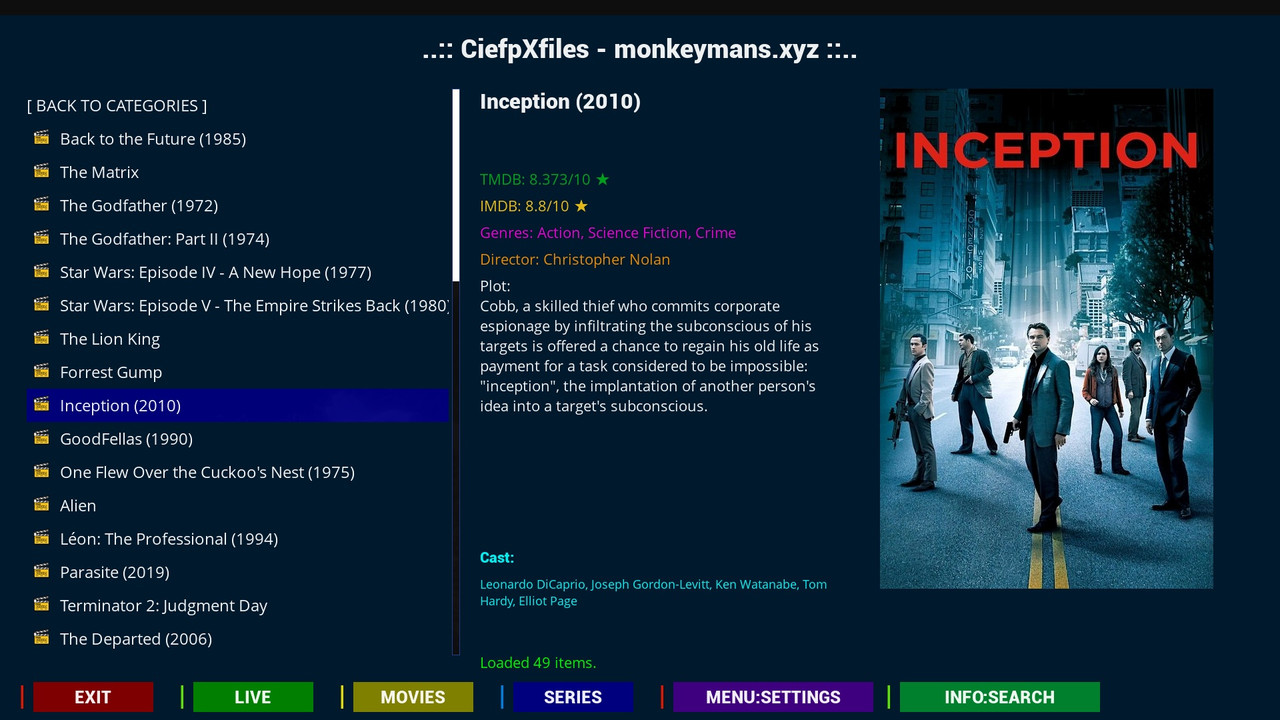
FHD Interface — A modern, 3-panel design (categories, information, poster).
TMDB and OMDb Integration — Automatically displays posters, descriptions, cast, directors, and IMDb ratings.
GROQ AI Translation — Automatically translates movie descriptions into Serbian (or another language).
Search — Quickly search for movies and series by title (using the INFO button).
Portal Status — Green/red indicators for online/offline servers. Automatic update — The plugin notifies you when a new version is available.
System folder — All data is stored in /etc/enigma2/CiefpXfiles/.
 Configuration
After installation, open the plugin from the menu. You will need to enter your API keys the first time you use it.
Press MENU (or SETTINGS at the bottom of the screen).
Enter the following keys:
TMDB API Key — Available for free at themoviedb.org. -- (tmdbapikey.txt)
OMDb API Key — Available for free at omdbapi.com. -- (omdbapikey.txt)
GROQ API Key — Available for free at console.groq.com. -- (groqapikey.txt)
SUBDL API Key — Optional, for subtitles. -- (subdlapikey.txt)
The SUBDL API key is not currently in use, but it is included in preparation for future versions.
Location for API keys: /etc/enigma2/CiefpXfiles/keys/
Configure the subtitle language, player type, and other options.
Click the Green button (Save).
 Location and files:
/etc/enigma2/CiefpXfiles/
playlist.txt
portals_cache.json
/etc/enigma2/CiefpXfiles/keys/
tmdbapikey.txt,omdbapikey.txt,groqapikey.txt,subdlapikey.txt
/etc/enigma2/CiefpXfiles/posters/
/etc/enigma2/CiefpXfiles/subtitles/
/etc/enigma2/CiefpXfiles/epg/
New file structure (Security):All your data (API keys, poster cache, playlists) are now stored in a secure location: /etc/enigma2/CiefpXfiles/.
This means that when you update or reinstall the plugin, your keys and lists remain saved.
 Playlist.txt
You can add to the playlist in two ways:
Format A (Structured)
text
Host:http://server
 ort
Username: xxxx
Password: xxxx
m3u:http://server
ort/get.php?username=xxxx&password=xxxx&type=m3u_plus&output=tsEPG: http://server
ort/xmltv.php?username=xxxx&password=xxxxFormat B (M3U links only)
text
http://server
ort/get.php?username=xxxx&password=xxxx&type=m3u_plus&output=tshttp://server
ort/xmltv.php?username=xxxx&password=xxxxThe file playlist.txt is located in /etc/enigma2/CiefpXfiles/playlist.txt.
 Remote Control Shortcuts
Button Function
OK Open category / Play stream
EXIT Close plugin
Green Live TV
Yellow Movies
Blue TV Series
MENU Settings
INFO Search
 Technical Details
Python: 3
Supported images: OpenATV, OpenPLi, OpenViX, OpenBH, Pure2, EGAMI
Players: Exteplayer3 (5002), GStreamer (5001), GStreamer (4097)
Cache: /etc/enigma2/CiefpXfiles/ (posters, EPG, keys)
 Note
This plugin is intended for personal use. The user is responsible for the legality of the IPTV content they watch.
 Author
ciefp — GitHub


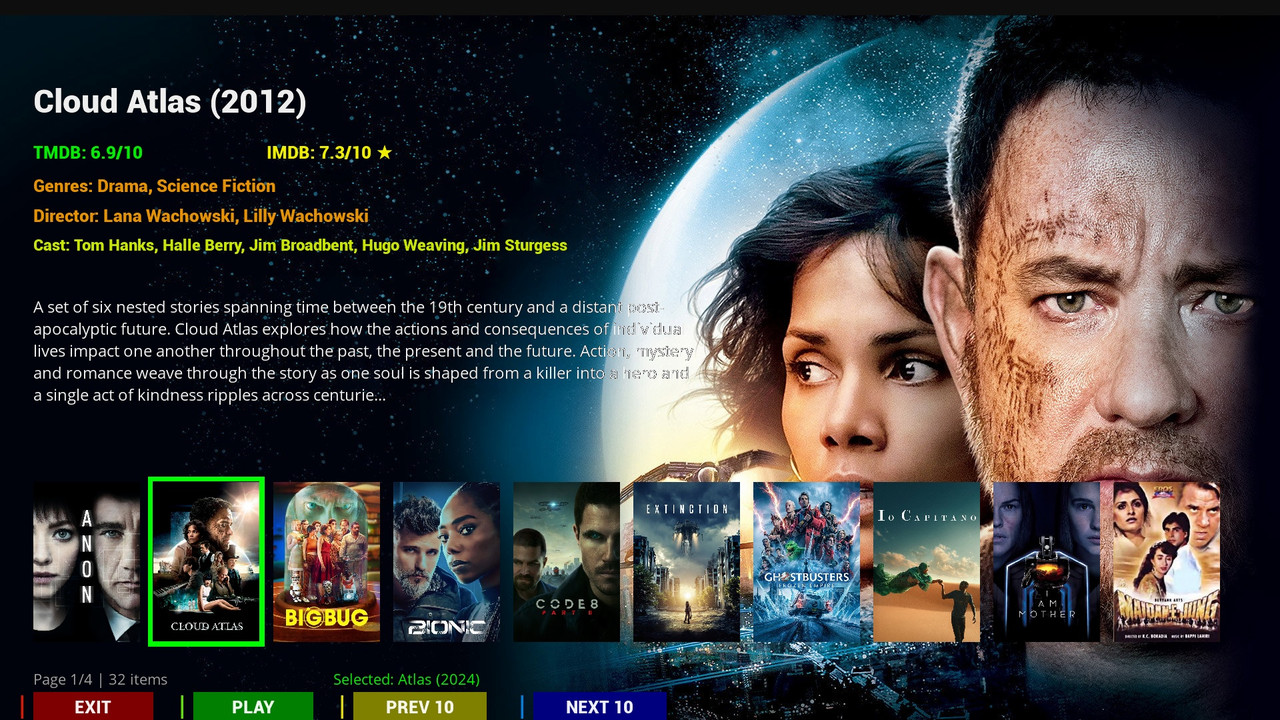
 New Modern Skin: Enabling this option in the Settings gives Movies and Series a completely fresh look. The original "Classic" skin remains available.
 Fullscreen Backdrop: The Modern view displays a large background image (backdrop) for each movie/series, overlaid with a dark gradient to ensure text readability.
 Horizontal Poster List: Instead of a vertical list, movies and series are presented as a horizontal row of posters (10 per page), with the ability to navigate forward and backward (PREV/NEXT).
 Visual Selection Frame: A green frame moves across the posters as you navigate left or right, providing clear visual feedback.
 Detailed Information: For every movie/series, the interface shows TMDB and IMDb ratings, genre, director, cast, and a full plot description.
 Improved Title Cleaning: The TMDB search function now better handles titles containing underscores, years, or language prefixes.
 Enhanced Poster Caching: Posters and backdrop images are cached, resulting in faster screen loading the next time you access them. Please be aware that browsing content downloads a large number of posters and backdrop images;