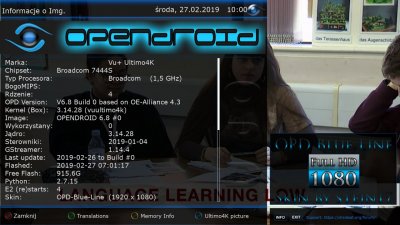
openDroid-Team, declares that soon we will be out with the new image openDroid 6.8, which will bring many improvements in terms of stability and image quality .. the enigma2 structure is completely different from version 6.7 and we have migrated to OE 4.3
The client mode allows you to run an Enigma 2 client receiver on an existing network without the need for local physical tuners. All channels and EPG data will be imported from the main server receiver.
Add NEW Guide install OPDBoot > press button info Add OPDBoot for box Arch Add new option Power LED Add Support octagon sf8008 single Add Support osmio4k Add Support zgemma H9 combo Add vuduo4k Add getDisplayType Add display panel model box Add a new screen for timezone setting Add skin info
Fix kodi Fix Button Setup Fix processor temp Fix audioselection Fix showEventInfo
The client mode allows you to run an Enigma 2 client receiver on an existing network without the need for local physical tuners. All channels and EPG data will be imported from the main server receiver. Fix led control sf8008 Fix EPG Search Fix OPD Boot/download online zgemma images Fix OPD_panel fix listdir Fix OPD_panel info Fix keySave and close, setup start mode in BluePanel Fix messageTuneFailed Fix multi archs in Osc@mSmartcard Fix HBBTV Fix t2mirawmode Fix KeyError: OPENDROID_yellowkey Fixed Various Bugs!!
Update OPDBoot v. 3.0
update splash Update bootlogo Update OPDpanel Update and fix skin OPD-BlueLine Update lcd Update GioppyGio settings & picons plugin v.2.1 Update 7segment Display Update missing patches Update Timezone Update the IT language Update flashOnline update imageBackup Update hw accel lock HISILICON
Important message!! if there are no unexpected events, the opendroid images 6.8 will be available this week .. stay tuned! Thanks to all openDroid-Team!
[QUOTE = "netguy, post: 97589, narys: 4229"]
todėl tai yra beta versija dabar
[/ QUOTE]
Does not accept the SoftwareManager plugin. What to do? Very good image, working well IPTV but i can*t make a backup. Tuner VU+duo2.
How to configure and use the "Client Mode" of OpenDroid
Inserted in OpenDroid 6.8 the new "Client Mode"
The client mode allows you to run an Enigma 2 client receiver on an existing network without the need for local physical tuners. All channels and EPG data will be imported from the main server receiver
To use the "Client Mode" from remote control go to >
Menu > General Settings > Tuner Configurations > Tuner Setup
This site uses cookies to help personalise content, tailor your experience and to keep you logged in if you register.
By continuing to use this site, you are consenting to our use of cookies.