VU+ Kodi Addons working proxys XBMC/KODI

Ten Below

SuperTux
Staff member
Admin
Sep 9, 2014
7,898
7,767
628
@vuplusimages
vuplus-images.co.uk
Tube+ = https://tubeplus.unblocked.pw
Vodly = https://vodly.unblocked.pw
Projectfreetv = https://projectfreetv.unblocked.pe
Movie4k = movie4k.unblocked.pe
Icefilms = icefilms.unblocked.pe
Watchseries = watchseries.unblocked.pw
Movie25 = movie25.unblocked.pw
iwatchonline = iwatchonline.unblocked.pw
watchfreemovies = watchfreemovies.unblocked.pw
1channel/primwire = primewire.unblocked.pe

Another for icefilms.
Code:
http://ipv6.icefilms.info/

One more for 1Channel from Banny (see lower down)
Code:
http://1chprimewire.eu5.org/
 
Last edited by a moderator:
Don't suppose we know if, the owner of the proxies/url's going to keep them updated so those URL's work all the time?

Or is it just use em while they are there?
 
Hello again,
I must be thick? Can you please assist me with the System > Settings > Addons > 1Channel > Configure - under the website tab you can enter custom domain or edit the default. I am unsure of where to go into. By "System, etc does that mean via FTP or the STB itself? Please excuse my ignorance.
 
Hello again,
I must be thick? Can you please assist me with the System > Settings > Addons > 1Channel > Configure - under the website tab you can enter custom domain or edit the default. I am unsure of where to go into. By "System, etc does that mean via FTP or the STB itself? Please excuse my ignorance.
Are you using the vu+ built in xbmc or the kodi direct addon by pcd?
 
  • Like
Reactions: ampedef
Original kodi direct, V 1 then upgraded to 2 via online update. I also have XBMC Plugin but one thing whilst I was looking through my setup, via DCC2, FTP, I noticed xbmc and XBMC2. Can't remember seeing both of those. I have also upgraded the Image to 131. Should I uninstall xbmc or XBMC2 or both for Kodi to work correctly. Seems that since XBMC is no longer supported do I need either?

xbmc has 8 files:
database
home
logpath
pic
profile
temp
tmp
vid

XBMC2 is populated with scripts

Thanks so far for your assistance
 
Last edited:
You can delete the old xbmc one as it is now known & maintained as this very plugin, just installed myself to have a look & there is no need add the proxy links as they are already there & working grand.
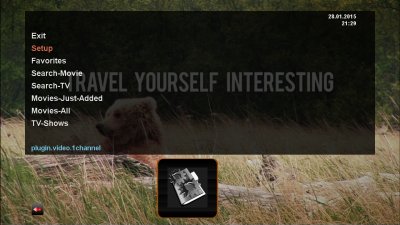
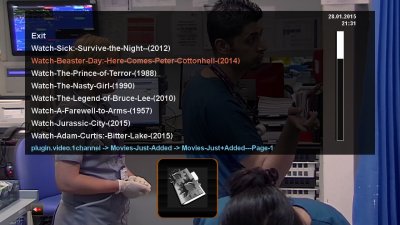
If you ever need to change the proxy go into setup in the 1channel menu as shown in the first picture below.

shot1.jpg

shot21.jpg

shot321.jpg
 
Many, many thanks Ten. I have removed xbmc and now running on Kodi. Just changing the setup values.
 
Still struggling :bangd: I have tried all ways to get most of the proxies to work to no avail. I have even tried changing to several images. I think I am doing /missing something. Latest Open Vix Image being used and TSMedia works a treat. Managed to watch A******* S***** last night, alright in SD but still watchable. I have upgraded via download Kodi and ftp'd Kodi. Nope still not running the video. It starts then black screen, sound but no video. Ah well I suppose I will have to stick with TSMedia, but not much in the way of naughty videos.
 
Finally. Got most of the addons working and streamed A******* S*****, via Kodi. Seems to be all OK.

Many thanks to all for your support
 
  • Like
Reactions: DirtyDonki
Just out of interest is there a solo 2 backup with these working that doesn't autoupdate when you start the addin. When I've tried the more recent backups the xbmc updates and nothing works. I still use a 6 month old image because it has working tsm. Cheers d
 
Just out of interest is there a solo 2 backup with these working that doesn't autoupdate when you start the addin. When I've tried the more recent backups the xbmc updates and nothing works. I still use a 6 month old image because it has working tsm. Cheers d

See this thread mate
 
  • Like
Reactions: ddee
Thx! I didn't notice that menu off to the left before either, it still doesn't work on my image because they updated before, but I'll try of the other backups later. I'll disconnect my internet when I update though because last time they just updated as soon as I started the plugin.
 
With these 1channel ect all working.
To install send the attached file to your HDD start xbmc/kodi then go to System > Settings > Add-ons > Install from zip file.
 

Attachments

  • Like
Reactions: supermario
Hi Guys
Thanks for this nice thread - Just a thought :) Is it possible to use proxy for adults addons as they are blocked in some parts of the world.